
The short version: which programmatic SEO tool should you choose?
The best programmatic SEO tools all take a keyword list or a dataset and publish live pages from it. Which one fits depends on where the difference between your pages is going to come from.
- Prismic when you need a lot of unique pages and their content has to be researched rather than pulled from a column. Comparison, use case, industry and integration pages.
- SEOmatic when the facts are already sitting in your spreadsheet and you want them live this week.
- Byword when you need articles only and have no use for a page layout builder.
- AirOps when your generation logic is bespoke enough that no packaged tool covers it, and you have someone to build it.
- Slate when you want that same custom pipeline without a multi-week ramp, and Webflow or WordPress is the destination.
The best programmatic SEO tools take you the whole way: a keyword list or a dataset goes in, live indexed pages come out, and nothing sits in the middle that you have to buy separately.
Five platforms do that today. They differ most in one place: where the words on each page actually come from. That difference decides whether a set of 400 pages earns traffic or sits in Search Console under "Crawled, currently not indexed."
Each entry below answers the same questions in the same order, so you can compare them on the things that shape the pages rather than on headline pricing.
What to look for in a programmatic SEO tool
Start with where the difference between your pages will come from. This is the criterion that decides the rest. If the input is a keyword and the tool researches it before writing, two pages differ because their research differed. If the input is a filled row and the tool builds a structure around it, two pages differ exactly as much as your columns did.
Both are correct answers. A tool that researches "Nike Pegasus 41 running shoes" is wasting your money if you already hold the price, the weight, the drop and the stock level. A tool that fills a template will produce thin pages if your spreadsheet holds only a city name.
Then check what the tool handles without you. Meta tags, schema, canonicals, sitemaps that update as pages publish, and internal links between the generated pages. This is on-page technical work that has to happen on every page in the set, and whether it is automatic or a step you build changes the real cost more than the subscription does.
Then how much control you keep. Whether a person has to approve before anything goes live, whether you can edit individual pages, schedule a batch across days, or roll back a bad template.
Then where the pages end up, and what happens to them if you stop paying.
The list below is ordered by the first criterion, from tools that research each keyword to tools that build a structure around your data. Every entry answers the same four questions, then best for, limitation and pricing.
One scope note. Several tools here also sell dashboards that monitor where your brand appears in AI answers. That is a separate purchase doing a separate job, covered in our comparison of GEO tools. This article judges every tool on the pages it produces.
The 5 best programmatic SEO tools
1. Prismic
Prismic takes a CSV of keyword variations and researches each one on its own before generating anything.
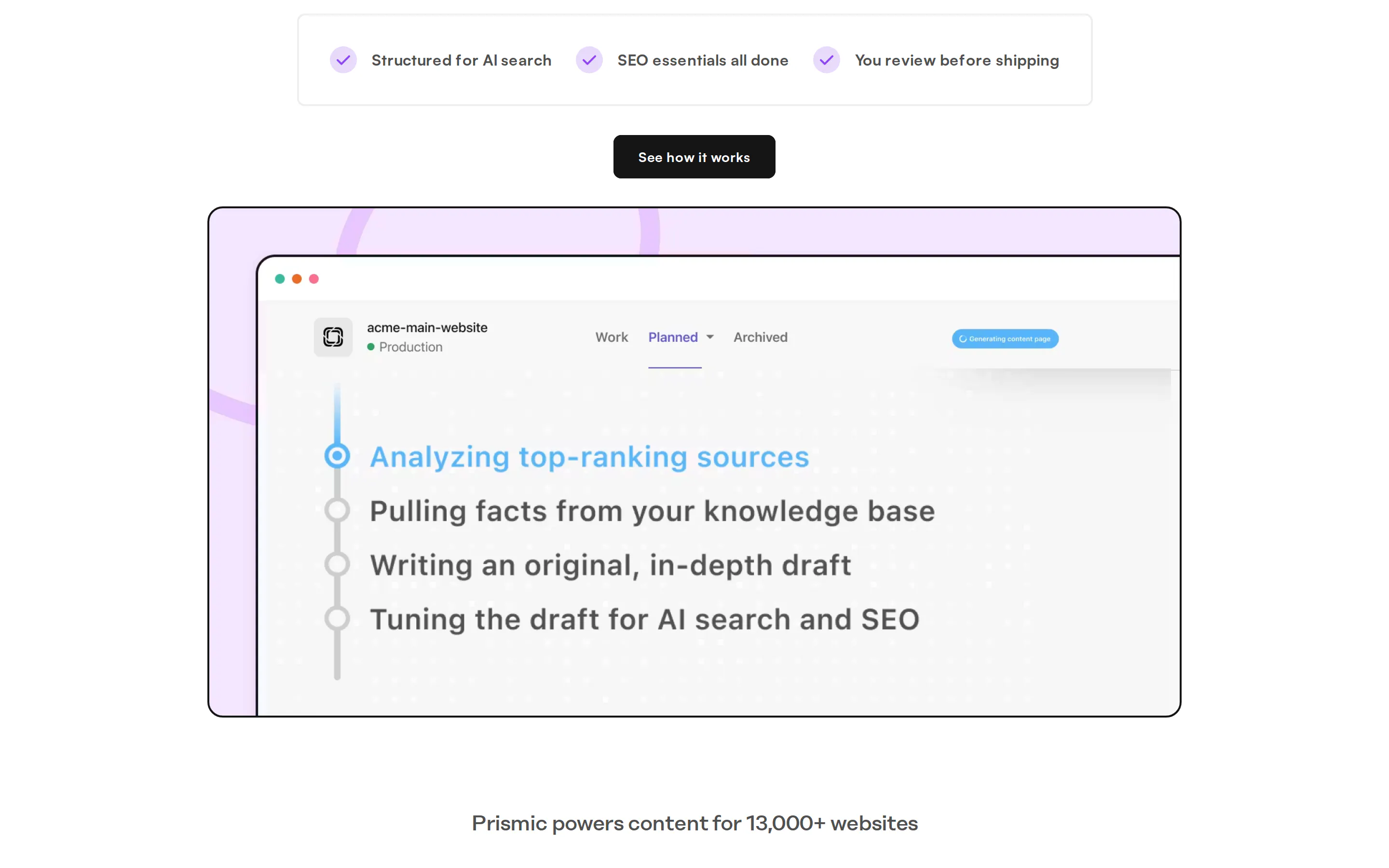
How pages get made: upload the keyword list, then either build a layout in the visual page builder or point Prismic at a page already live on your site to pick up its structure and brand. Each variation is researched separately for its own angle, so the pages diverge on substance rather than on a swapped noun. Drafts are grounded in material you own: sales calls, internal docs, Notion and Google Drive, which puts product detail and customer phrasing on the page that a competitor cannot assemble from search results.
What it handles automatically: meta titles and descriptions, schema, semantic markup, FAQ blocks, internal links between the generated pages, and images generated to match each topic with alt text written for them.
Publishing and control: generated pages land in a release as drafts. Nothing goes live until a person opens the release and approves it, and you can edit any page before it publishes. Publish into Prismic, or push into your existing CMS through an integration.
Best for: pages that cannot be generated from a spreadsheet because each one needs its own argument. Use case, industry, comparison and integration pages your site is missing.
Limitation: it does not do keyword research. You supply the list, so pattern discovery and search volume still come from Ahrefs, Semrush or Search Console before anything starts.
Pricing: Budgeting starts with a demo and pricing depends on the total number of pages to be published and managed
2. AirOps
AirOps is a content engineering platform where you build the generation pipeline yourself and then run it across a spreadsheet.
How pages get made: you chain steps in a visual builder, deciding how much research happens per page and which of 30-plus models runs each step. Grids then execute that workflow across every row, importing from CSV or pulling directly from Search Console, Webflow and WordPress. Brand Kits hold tone rules and Knowledge Bases hold your proprietary context, so output stays grounded and on-brand across a batch.
What it handles automatically: whatever you build into the workflow. Meta generation, internal linking and schema are all achievable as steps, but they are steps you assemble rather than defaults you inherit.
Publishing and control: workflows can pause for editor approval before anything publishes, and Grids let you compare versions side by side before pushing to WordPress, Webflow, Shopify, Contentful or Strapi.
Best for: generation logic bespoke enough that no packaged tool covers it, when you have someone to own the pipeline as an actual job.
Limitation: Grids slow noticeably past a couple of hundred rows with AI columns, which is roughly where programmatic work starts. It is also the steepest ramp of the five: reviewers consistently report two to three weeks before a team is productive, which is the price of a builder this open.
Pricing: Solo $200/month for 20,000 tasks, Pro roughly $2,000, nothing in between. Billing is per task, so testing spends the same budget as production.
3. Slate
Slate generates pages from structured data through reusable workflows, then runs them across hundreds of rows in a spreadsheet interface called Power Sheets.
How pages get made: you assemble composable nodes (research, write, interlink, generate images, publish) into a workflow, and workflows can nest inside one another. Map your sheet columns to the workflow inputs, run every row, and review the output in the sheet. A Brand Kit and knowledge base keep a batch consistent, and live keyword data from Semrush and Ahrefs can be pulled in as workflow blocks.
What it handles automatically: internal linking, image generation and competitor screenshots are available as nodes in the chain rather than as separate work. Connected Search Console and GA4 feed page-level performance back in.
Publishing and control: review gates can sit at any step, workflows can run on a schedule instead of waiting to be triggered, and approved pages push straight to Webflow or WordPress. If Webflow is the destination, note its ceiling: Premium allows 20,000 CMS items and 40 Collections since Webflow merged its plans in May 2026.
Best for: the same custom pipeline as AirOps when Webflow or WordPress is your destination and you want batches running in days rather than weeks.
Limitation: publishing is limited to Webflow and WordPress, so a headless or custom stack needs the API and someone to wire it. As with AirOps, the platform sets a ceiling rather than a floor: a shallow workflow produces shallow pages just as fast as a good one.
Pricing: from $199/month. Launched in 2025, so the track record is short.
Turn your keyword list into pages your site is missing
See how Prismic researches each keyword variation against your own calls and docs, then drafts pages that wait for your approval. Bring your list and we will walk through it live.
4. SEOmatic
SEOmatic connects a dataset to a visual template and publishes every variation as a standalone indexed page. It is the shortest path here from spreadsheet to live URLs.

How pages get made: upload a CSV, connect Google Sheets or Airtable, or start from SEOmatic's own dataset library. Build the template visually, drop in dynamic variables, and use spin syntax to vary phrasing between rows. An AI writer fills the longer text fields, so the words come from your dataset plus generation on top of it.
What it handles automatically: this is the strongest part of the product and the least enjoyable to build yourself. Self-referencing canonicals per page, sitemaps that update as pages publish, automated internal linking between variation pages, and schema generation across the set.
Publishing and control: an approval workflow, autonomy modes that set how much the agent does unsupervised, drip publishing to spread a batch out rather than dumping it, one-click rollback, and agents that read your Search Console data. Thirteen CMS integrations, or SEOmatic hosts the pages itself on your domain.
Best for: a spreadsheet you already have where every row holds real facts. Store locations, product specs, integration details, unit or currency conversions.
Limitation: nothing researches the individual variation, so page substance is capped by your dataset. Two thin rows produce two thin pages, and spin syntax varies the phrasing rather than the content.
Pricing: $149/month for 1,000 pages, $399 for 5,000, $899 for 20,000, with per-page overages.
5. Byword
Byword generates full articles in batches from a keyword list, with a programmatic builder that expands a title or keyword structure into every combination of its variables.
How pages get made: define a structure such as "best {service} in {city}", and Byword generates every valid keyword, then sends the whole set to the batch generator. It writes complete long-form articles rather than filling fields, with configurable tone and brand voice, and supports a wide range of languages for international sets.
What it handles automatically: meta tags, formatting and heading structure per article, plus interlinking between generated pieces as an option.
Publishing and control: publishes to WordPress, Webflow, Ghost, Shopify, HubSpot and Notion, as draft, pending or live. Batches can be scheduled across 3 to 180 days, and higher plans submit URLs to Google's indexing API automatically.
Best for: long-form informational articles at volume, when you need words on a page and no control over how the page looks.
Limitation: the output is article bodies, so a set of designed landing pages is out of reach here in a way it is not with tools that write into a template you control. Ceilings are counted in articles rather than pages, which is restrictive for programmatic work, and reviewers consistently describe raw output as a first draft.
Pricing: Starter $99/month for 25 articles, Standard $299 for 80, Scale $999 for 300. Free start at 5.
How the programmatic SEO tools compare
Publishing destinations are covered in each entry and in the CMS question below, so the table sticks to what shapes the pages themselves.
Tool | What makes pages differ | Template built in-tool | Schema and internal links | Approval before publish |
|---|---|---|---|---|
Prismic | Research per keyword | Yes, or from a live page | Automatic | Required |
AirOps | Your workflow | No, output only | Build as steps | Optional step |
Slate | Your workflow | No, output only | Build as nodes | Optional gate |
SEOmatic | Your dataset row | Yes, visual | Automatic | Yes |
Byword | Your keyword structure | No | Interlinking option | Draft status |
Mistakes to avoid when doing programmatic SEO
Publishing thousands of pages in one go. Publish 20 to 50, wait two weeks, and check what share got indexed. If most did, scale. If most did not, more pages will not fix it. Batch size is a diagnostic, not a safety measure: Google's spam policies name no page count at all. What they do name is doorway abuse, which covers substantially similar pages that sit closer to a set of search results than to a browseable part of your site. A batch of 300 pages that differ by a place name fits that description whether you publish them on Monday or across six months.
Building on a dataset that is too thin. If a row holds a city name and nothing else, no tool turns it into a page worth landing on. Deepen the data or research each page individually. Volume will not compensate.
Skipping the review step because the tool has one. An approval gate you always click through is not a review. Read the first twenty pages of every batch properly, because template-level problems repeat across the whole set.
Not validating the pattern before building for it. Check that the keyword shape has real demand and that the pages you are about to make can plausibly satisfy it. This is the judgement no tool makes for you, and it decides more than the tool choice does.
Treating page count as the goal. A strong pattern with a cheap tool beats a weak pattern with an expensive one every time.
Final thoughts on the right programmatic SEO tool
For most teams the hard part of programmatic SEO is not publishing faster. It is producing pages that deserve to exist when the difference between them cannot be pulled from a spreadsheet column.
Prismic is built for that case. Give it the list of pages your site needs and does not have, and it researches each one separately against your sales calls, internal docs and knowledge base.
Each page is drafted with its meta tags, schema, FAQ blocks, internal links and images already in place, then waits in a release until you read it and approve it. Nothing reaches your site that you have not seen.
Frequently asked questions
Keep reading