Say goodbye to one by one landing page creation
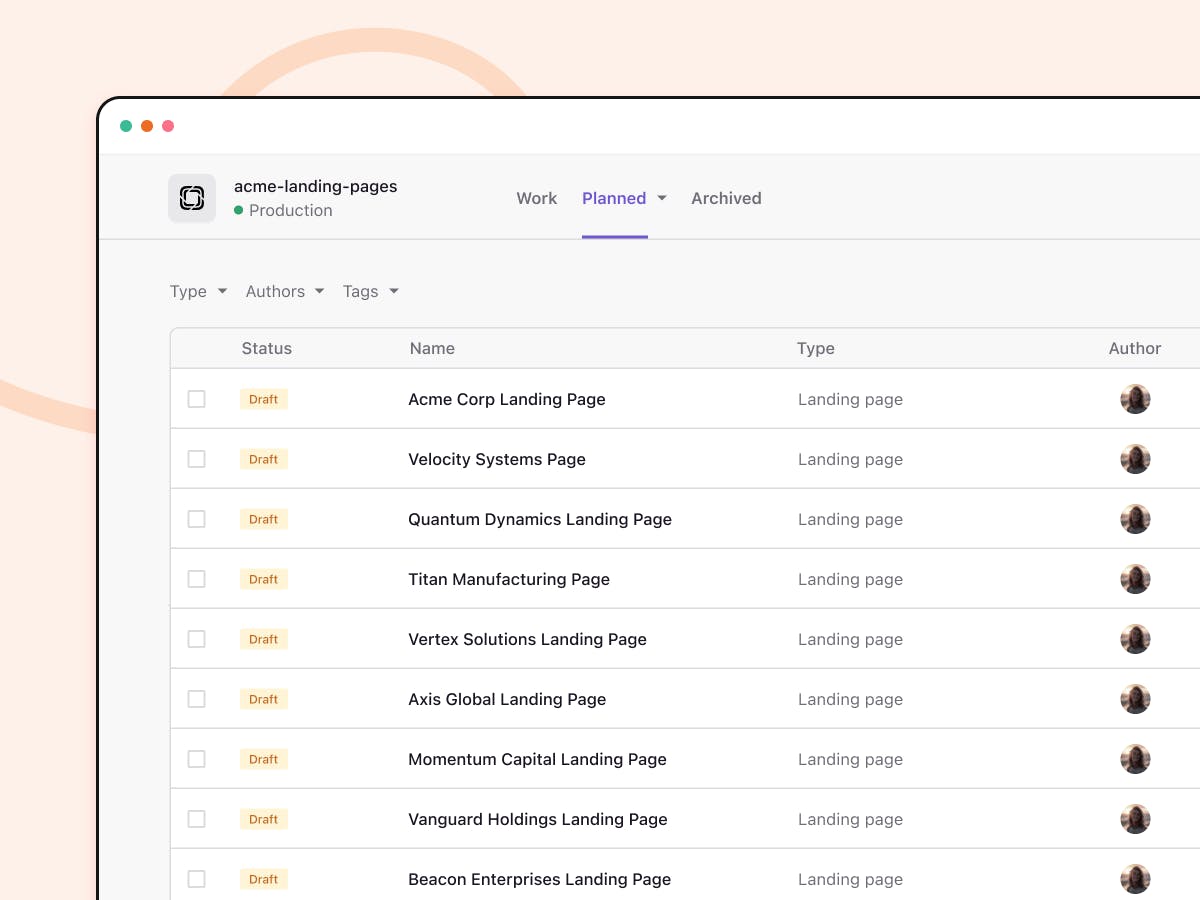
Even the best ABM campaigns fall apart at the landing page. You can target the right accounts and run great outreach, but if the destination feels generic, momentum dies fast.
Unbounce and Prismic both build landing pages, but they approach ABM personalization from opposite directions. One optimizes individual pages, while the other generates hundreds of tailored variations from a single source. This guide breaks down how each tool handles personalization, scale, and workflow so you can pick the right fit for your program.
What is Unbounce
Prismic and Unbounce serve different needs for Account-Based Marketing. Unbounce is a standalone landing page platform focused on lead generation and conversion rate optimization, while Prismic offers a dedicated ABM landing page builder designed for creating personalized page variations at scale using your account data.
Unbounce launched in 2009 as a drag-and-drop builder that lets marketers create, publish, and A/B test landing pages without developer help. The platform centers on conversion optimization, with templates, smart traffic routing, and testing tools built in.
For general marketing campaigns where you're optimizing a single page for maximum conversions, Unbounce works well. However, ABM programs that require dozens or hundreds of account-tailored pages run into a bottleneck: you're building one page at a time.
What is Prismic's ABM landing page builder
Prismic's ABM landing page builder takes a different approach. Instead of building pages individually, you create one approved base page that locks in your design, brand voice, and structure. That base page becomes your source of truth for everything that follows.
From there, you upload the account data you already have, including company names, industries, roles, firmographics, or enrichment data from tools like Clay. Prismic then generates dozens or hundreds of page variations that stay on-brand while adapting the message to each account's context.
This is a marketing-only tool. Your team doesn't file developer tickets or wait for design resources. Pages arrive as editable drafts in organized batches, ready for review and approval before anything goes live.
ABM landing page feature comparison
Here's how the two tools compare across ABM-critical capabilities:
Prismic ABM vs. Unbounce ABM
| Prismic ABM landing page builder | Unbounce page building | |
Page creation | Base page + automated variation generation | Drag-and-drop builder |
Personalization method | Data-driven narrative tailoring | Dynamic text replacement |
Brand control | Locked design system with editable drafts | Template-based |
Account-level tracking | Personalized URLs | Limited |
Scale approach | Batch generation from account lists | One page at a time |
Landing page creation and templates
Unbounce offers a library of pre-built templates you can customize with their visual editor. Each page is a standalone project, which works well for one-off campaigns but becomes repetitive when you are targeting multiple accounts.
Prismic's base page model works differently. You build one page that defines your approved structure, then that single source of truth spawns all your variations. Changes to the base page flow through to variations, keeping everything consistent without manual updates.
Personalization depth
Unbounce uses dynamic text replacement (DTR), which swaps tokens based on URL parameters. You might replace {company} with "Acme Corp" in your headline. It's straightforward, but the underlying page structure and narrative remain identical for every visitor.
Prismic's approach goes deeper. The system analyzes your account data to find meaningful angles, including industry context, likely pain points, and relevant use cases, and adapts the narrative itself. Headlines, framing, proof points, and product emphasis can all shift based on what matters to each account.
Brand control and design flexibility
With Unbounce, brand consistency depends on your team's discipline in using templates correctly. Each page is fully editable, which offers flexibility but also introduces risk of drift over time.
Prismic locks in your approved design and voice at the base page level. Variations inherit that foundation, so your brand stays consistent across hundreds of pages without manual enforcement.
Analytics and account-level tracking
Unbounce excels at page-level conversion metrics, so you can see how a page performs in aggregate. Tracking which specific accounts engaged typically requires additional tools or manual UTM tagging.
Prismic provides personalized URLs and account-level engagement signals out of the box. You can see which target accounts visited their tailored pages before they ever fill out a form, helping surface ABM traction earlier in the sales cycle.
How personalization works in each tool
The mechanics of personalization differ significantly between platforms, and those differences affect what's realistic for your ABM program.
Dynamic text replacement in Unbounce
DTR works by reading URL parameters and swapping placeholder text. For example, a URL like yourpage.com?company=Acme&industry=Manufacturing would display "Acme" and "Manufacturing" wherever you've placed those tokens.
This approach is fast to set up and works well for simple personalization. The limitation: you're still showing the same page structure, same value propositions, same proof points. Only the tokens change.
Data-driven variation generation in Prismic
Prismic takes your uploaded account data, typically a CSV with company names, industries, employee counts, and other firmographic details, and generates unique pages for each row.
Each page can adapt its narrative. An enterprise manufacturing company might see messaging about scale and reliability, while a mid-market SaaS company sees messaging about speed and integration. Same base page, genuinely different stories.
Using industry and firmographic data
Firmographic data describes company characteristics: industry, size, revenue, location, tech stack. Both tools can leverage this data, but they apply it differently.
- Unbounce: Uses firmographics for token replacement in existing copy
- Prismic: Uses firmographics to inform which angles, proof points, and use cases appear on each variation
The depth of application determines whether personalization feels surface-level or genuinely relevant to the account.
ABM landing page production at scale
The real test for ABM tools: can you realistically personalize pages for dozens or hundreds of accounts without burning out your team?
Creating variations for multiple accounts
The workflow difference is significant:
- Unbounce: Duplicate your template, manually edit each page, repeat for every account
- Prismic: Upload your account list, generate all variations from one base, review in batches
For a 10-account pilot, either approach works. For a 100-account program, the manual path becomes unsustainable quickly. This same principle of generating page variations at scale applies whether you're targeting accounts or keywords.
Workflow speed and common bottlenecks
Most ABM teams hit the same walls: waiting for design to create new layouts, waiting for copywriters to tailor messaging, and waiting for developers to publish pages. These bottlenecks exist regardless of which tool you use unless the tool eliminates them.
Prismic's batch generation removes the per-page production work. VITRONIC, for example, launched a 60-page personalized ABM campaign in about 90 minutes, work that previously took weeks of coordination.
Review and approval processes
Speed means nothing if quality suffers. Prismic delivers variations as grouped drafts, so your team can review batches efficiently. Many teams find the quality strong enough to spot-check a handful of pages rather than reviewing every single one.
How to integrate account data for personalization
Your personalization is only as good as the data feeding it.
CRM and enrichment tool connections
Both tools can work with data from Salesforce, HubSpot, and similar platforms. Unbounce typically receives this data through URL parameters passed from your marketing automation. Prismic accepts direct data uploads, making it easier to leverage enrichment platforms like Clay or Clearbit.
Importing account lists and firmographics
Prismic's workflow centers on CSV uploads. You export your target account list with whatever fields you have, such as company name, industry, employee count, tech stack, or custom fields, and the system uses that data to generate variations.
Unbounce relies more on real-time URL parameters, which works well for ad-driven traffic but requires more setup for outbound or email campaigns.
Leveraging first-party and third-party data
First-party data comes from your own systems: CRM records, product usage, support history. Third-party data comes from enrichment providers who fill gaps in your account profiles.
Prismic can use both. Upload whatever you have, and the system adapts messaging based on available data points. More data typically means more relevant personalization.
Ease of use for marketing teams without developers
Can your marketing team run this independently? Here's the honest breakdown:
- Unbounce: Visual builder requires no code. Marketers control everything. But each page is manual work, so scale depends on team capacity.
- Prismic ABM Builder: Marketing-only tool by design. No developer tickets for page creation. Batch generation reduces repetitive tasks significantly.
Prismic's broader platform includes developer tools for building the underlying website, but the ABM landing page builder is specifically designed for marketing autonomy and comes with a setup as part of the solution.
Pricing for ABM landing page programs
Pricing structures differ based on how each tool is designed.
Unbounce pricing
Unbounce uses tier-based pricing tied to conversions and visitor limits. Higher tiers unlock more pages and traffic capacity. For ABM programs with many low-traffic, highly-targeted pages, understanding how their limits apply matters.
Prismic pricing
Prismic's ABM builder has its own pricing, separate from the headless CMS. The model is designed for teams generating high volumes of personalized pages, so pricing reflects that use case rather than per-page or per-visitor limits.
Which tool fits your ABM program
The right choice depends on your program's maturity and scale requirements.
When Unbounce works best
Unbounce makes sense when you have:
- A small number of target accounts (under 20)
- Simple personalization like company name and basic messaging
- A team comfortable with manual page creation
- Existing Unbounce usage for other marketing campaigns
When Prismic is the better fit
Prismic becomes the stronger choice when you're:
- Scaling to dozens or hundreds of accounts
- Looking for narrative-level personalization beyond token swapping
- Trying to reduce production bottlenecks and developer dependencies
- Needing account-level engagement tracking for attribution
Tips for high-converting ABM landing pages
Regardless of which tool you choose, a few practices improve ABM landing page performance.
1. Match your landing page message to your outreach
The landing page continues a conversation started by your ad, email, or sales outreach. If the messaging doesn't align, you break trust immediately. Use the same language, reference the same pain points, and deliver on whatever promise brought them to the page.
2. Use account-specific proof points
Generic case studies feel generic. Tailor your social proof to the target account's industry, company size, or use case. A manufacturing company wants to see manufacturing examples, not SaaS success stories.
3. Keep the conversion path simple
ABM pages often try to do too much. One clear call-to-action, minimal form fields, and a focused message outperform pages that hedge with multiple offers.
4. Track engagement at the account level
Page-level metrics tell you how a page performs overall. Account-level tracking tells you which specific companies engaged. For ABM, the second metric matters more because it helps you prioritize follow-up and prove program value before deals close.
Why ABM teams choose Prismic for personalized landing pages
Prismic's ABM landing page builder turns one approved page into hundreds of tailored variations using the data you already have. Marketing stays in control, pages launch in hours instead of weeks, and account-level engagement signals help surface traction earlier in the sales cycle.
Ready to convert accounts in a flash?
Stop guessing. Deliver personalized landing pages for your ABM campaigns. All it takes is a couple of clean data points paired with the click of a button.
