
Your Next.js project works fine until the 10,001st record crosses Contentful's free tier threshold and your site starts serving empty responses. That moment, well-documented in developer forums, is what this best free headless CMS comparison is designed to prevent. Every platform here offers a genuine free tier or open-source self-hosting option. The table below shows where each one breaks.
TL;DR
- Prismic's free plan includes unlimited documents, 4M API calls/month, and 100GB CDN with no record ceiling. The single-user restriction lifts at $10/month, the lowest paid entry point in this comparison.
- Sanity has the most generous cloud-hosted free tier for teams: 1M CDN requests, 250K direct API calls, and 20 editor seats, with no record cap until 10,000 documents.
- Contentful's free plan tightened in April 2025, adding a 25-content-type cap alongside the existing 100K API call and 10K record limits. The jump to paid is $300/month.
- Strapi, Directus, and Payload CMS are free forever when self-hosted, but the real cost is infrastructure time and DevOps maintenance, not software licensing.
- Hygraph's free tier caps at 1,000 records. The next tier jumps directly to $199/month with no option in between.
- Ghost is free to self-host, but newsletter email delivery through Mailgun adds $35/month once you pass roughly 20,000 monthly sends.
Free headless CMS at a glance
Tool | Best for | Free tier limit | G2 rating | Paid from |
|---|---|---|---|---|
Prismic | Developers who want unlimited docs and a visual builder editors can use | 1 user, 4M API calls/mo, unlimited docs | 4.3/5 (361) | $10/mo |
Sanity | Developer teams wanting generous API limits and multi-seat free access | 10K docs, 250K API calls/mo | 4.7/5 (911) | $15/seat/mo |
Contentful | Projects using existing Contentful integrations | 100K API calls, 10K records, 25 types | 4.3/5 (312) | $300/mo |
Payload CMS | TypeScript-first apps needing a co-located CMS | Self-host: no content limits | 4.9/5 (59) | Self-host free |
Strapi | Full-control self-hosted with a plugin ecosystem | Self-host: no content limits | 4.5/5 (205) | $35/mo cloud |
Directus | Wrapping an existing database with a CMS layer | Self-host: 3 seats, 25 collections | 4.9/5 (52) | $99/mo cloud |
Ghost | Blog + newsletter in one self-hosted stack | Self-host: no content limits | No G2 profile | $18/mo managed |
Hygraph | GraphQL-native and federated content APIs | 1K records, 500K API ops | 4.4/5 (730) | $199/mo |
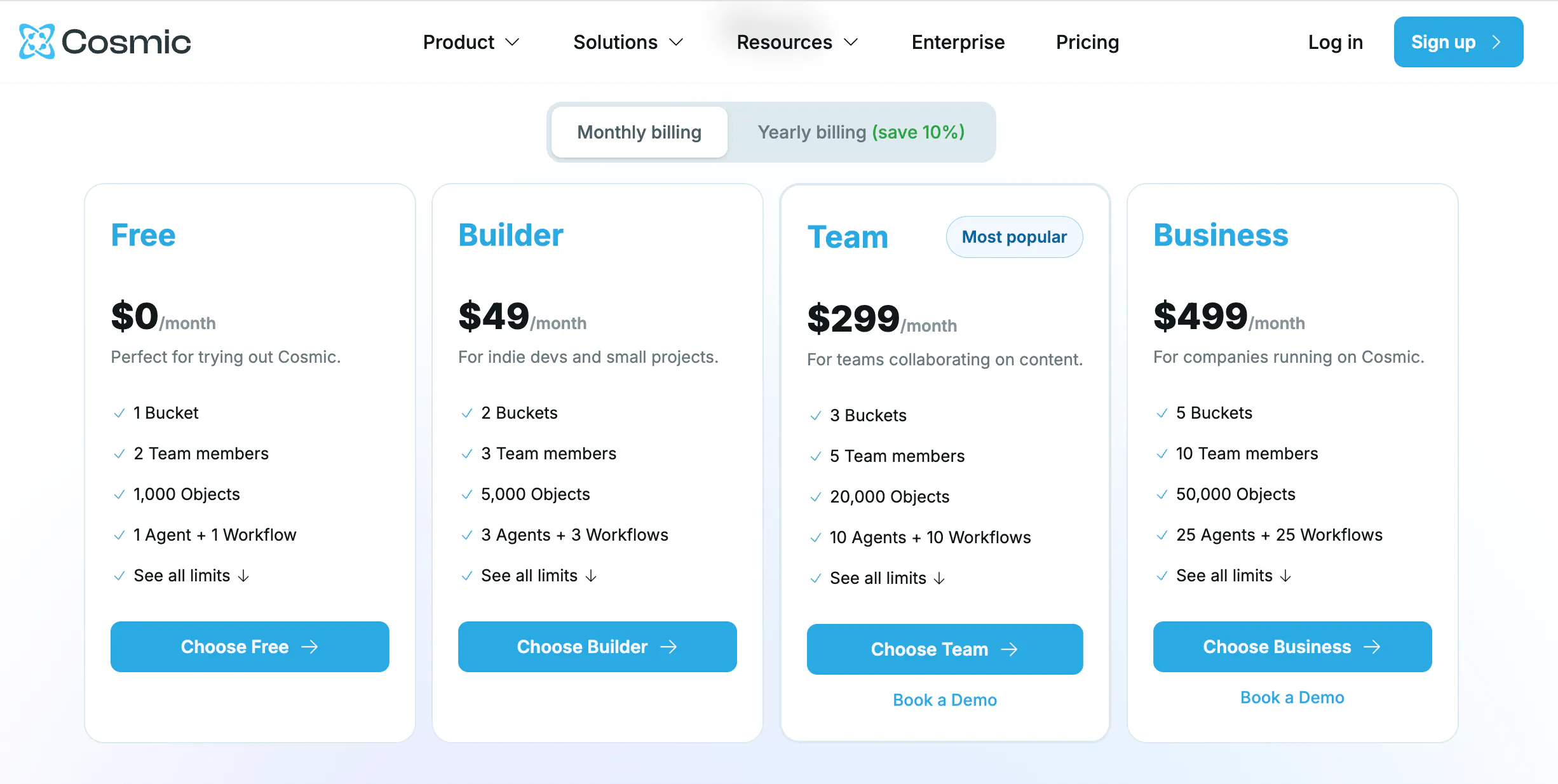
Cosmic JS | Solo developers or micro-projects | 1K objects, 10K API req/mo | 4.3/5 (6) | $49/mo |
The 9 best free headless CMS platforms
1. Prismic
Best for: Developers who want unlimited content on the free plan paired with a visual page builder that non-technical editors can operate without developer support on every update.
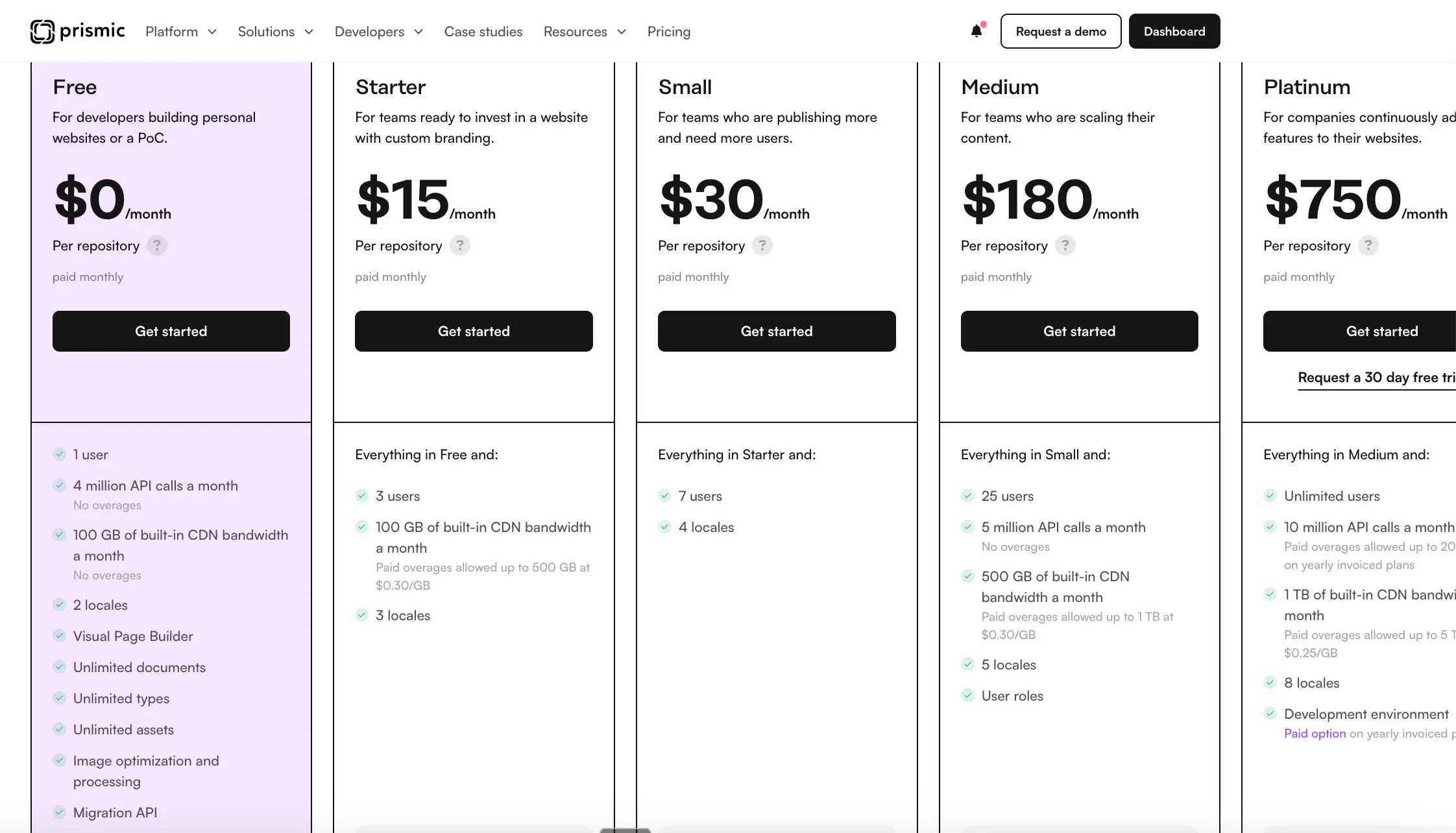
Prismic is a hosted headless CMS with a visual page builder built in. Developers define reusable content sections and custom types using the Type Builder, a cloud-based modeling interface that runs entirely in the browser with no local tooling required. Editors assemble and update pages from those sections without touching code.
The free plan carries no document ceiling and the highest API call allowance in this comparison.
Key features for free-tier projects
- Unlimited documents, custom types, and assets on the free plan (no record ceiling)
- 4M API calls/month and 100GB CDN bandwidth
- Type Builder: browser-based content modeling that saves automatically, with no local setup required
- Visual page builder where editors compose and update pages from developer-defined sections without modifying code
- 2 locales included on the free plan for basic multi-language projects
Pros
The unlimited document limit means content-heavy sites never hit a hard ceiling on the free tier, unlike Contentful (10K records) or Hygraph (1K records). The reusable section model separates design decisions from content operations: developers define what editors can configure; editors assemble pages without being able to break layout or introduce inconsistencies.
The Type Builder requires no local setup. Content modeling happens directly in the Prismic dashboard, changes persist automatically, and TypeScript types generate through the Prismic CLI for codebases that rely on type-safe data fetching.
The Migration API handles programmatic content imports, which reduces the friction of moving from another CMS.
Cons
The free plan restricts the account to one user. A second editor or developer seat requires the $10/month Starter plan, which is the lowest upgrade cost in this comparison.
The component-based content model has a learning curve for developers coming from field-based CMS setups. Understanding how developer-defined sections map to the visual builder takes time to internalize. Some reviewers note that highly custom one-off design treatments require more planning than direct template control would.
Pricing
Free forever for one user: unlimited documents, custom types, and assets; 4M API calls/month; 100GB CDN; 2 locales. Starter plan starts at $10/month per repository (billed annually), adding 3 users and 3 locales.
G2: 4.3/5 (361 reviews)
2. Sanity
Best for: Developer teams who want a cloud-hosted CMS without running into record limits in the first few months of a real project.
Sanity separates content modeling and delivery: developers define schemas in code, editors use the hosted Studio UI, and all content is queried through GROQ (Graph-Relational Object Queries) against Sanity's CDN. The free plan includes real-time collaboration and the hosted Studio from day one, with limits high enough that most small commercial sites never leave it.
Key features for free-tier projects
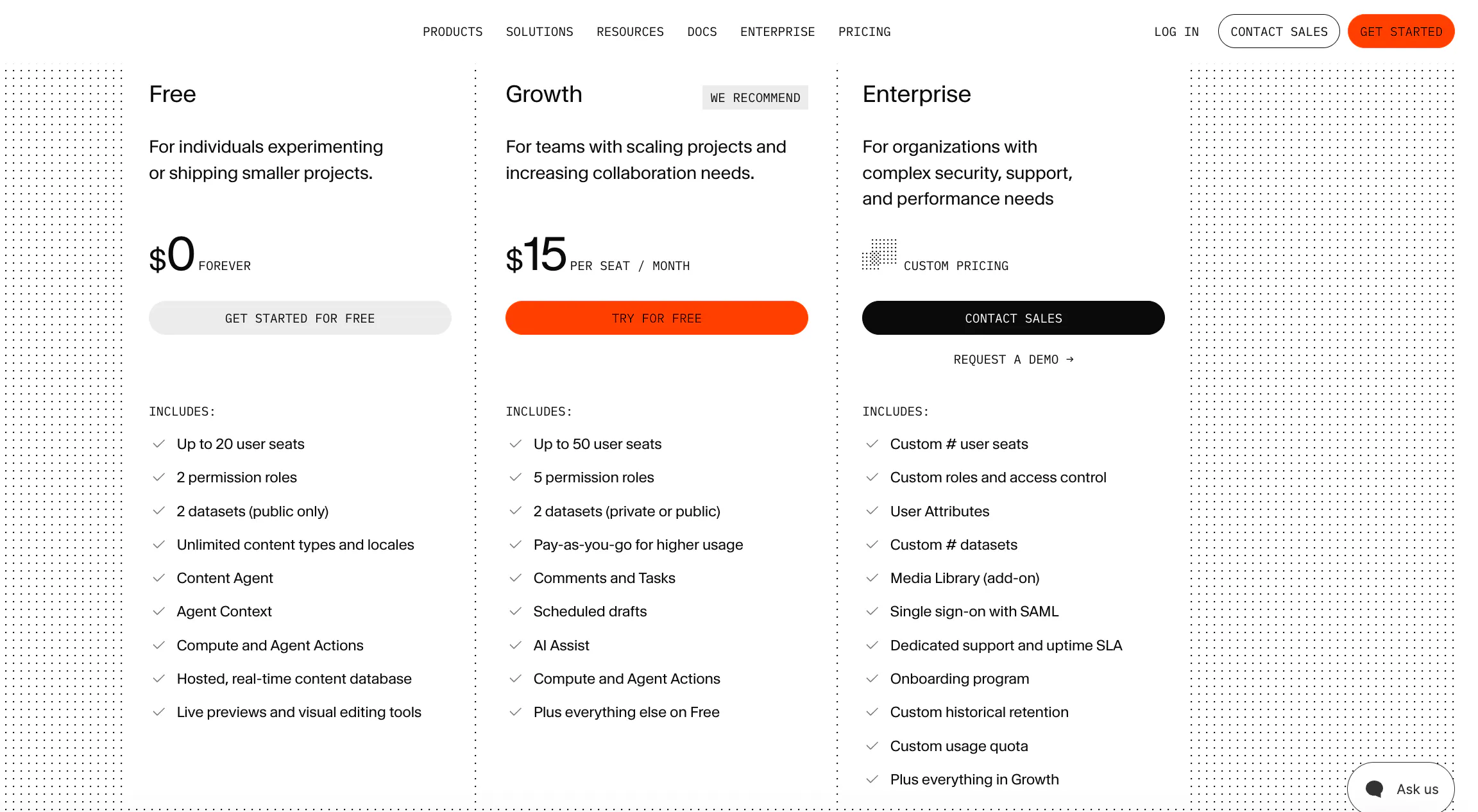
- 1M CDN-delivered API requests and 250K direct API calls per month
- 20 editor seats (more than any other hosted platform in this list)
- 100GB asset storage with image transformation built into delivery URLs
- Real-time collaboration and draft/publish workflow at no additional cost
Pros
GROQ lets you fetch deeply nested content in a single request rather than chaining multiple REST calls, which reduces both latency and frontend complexity. The free-tier API headroom is large enough for most portfolio sites, small e-commerce projects, and content-heavy blogs to operate indefinitely without paying.
Cons
GROQ is not a standard query language. Teams without prior Sanity experience have to invest time learning it before anything ships. Non-technical editors find the Studio unintuitive without developer-configured field labels and descriptions.
At scale, some reviews report performance degradation when a single dataset holds 400+ documents, and there are no built-in bulk operation tools (bulk delete, bulk publish) without custom plugins.
Pricing
Free forever at the limits above. Growth plan starts at $15/seat/month (billed annually), which adds more datasets and higher API limits.
G2: 4.7/5 (911 reviews)
3. Contentful
Best for: Teams with existing Contentful integrations or starters, or developers who want the most documented framework integration path.
Contentful's free Community plan is the most referenced starting point for headless CMS projects. The API surface is mature, REST and GraphQL are both supported, and integrations with Next.js, Gatsby, and Astro are well documented with maintained starter projects. The content modeling UI is accessible for non-developer editors.
Key features for free-tier projects
- REST and GraphQL Delivery APIs plus a Preview API on the free plan
- 2 environments (useful for development and staging workflows)
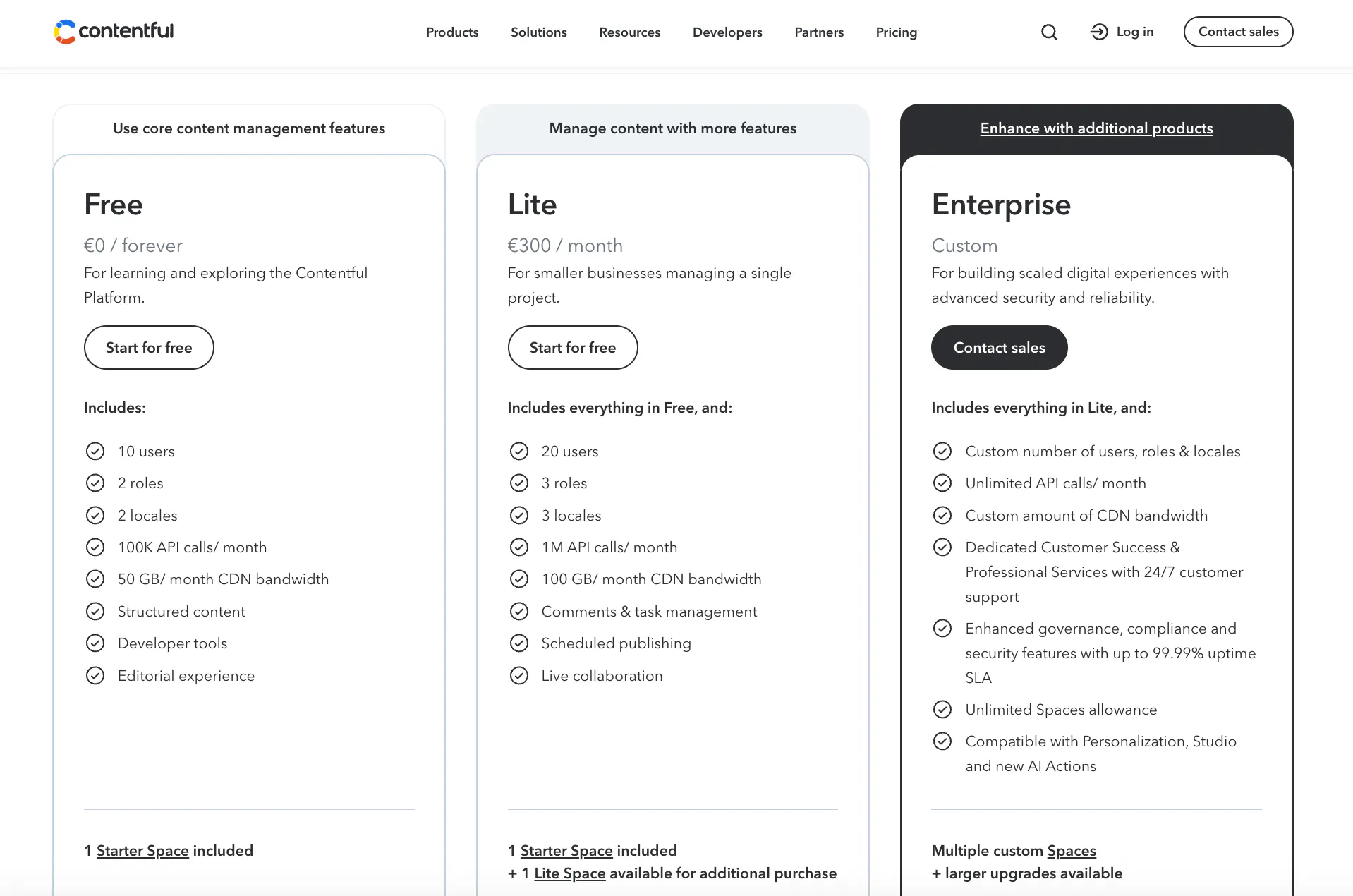
- Up to 10 users on a single space
- Roles and permissions configurable across those users
Pros
The content modeling interface is approachable for non-developers: field types, validation rules, and reference fields are configured through clicks rather than code. The documentation is thorough and consistently maintained. The community is large enough that most edge-case framework integration problems already have a StackOverflow answer.
Cons
100K API calls/month is hit quickly on any site that renders content on each request rather than statically. The April 2025 update added a 25-content-type cap, affecting teams who had relied on an unlimited content model structure.
The pricing cliff is the sharpest in this comparison: the free plan ends at 10K records or 100K API calls, and the next tier is $300/month with no middle option. Support on the free plan is slow.
Pricing
Free Community plan: 100K API calls/month, 10K records, 25 content types, 2 environments, 10 users, 50GB CDN bandwidth. Paid starts at $300/month.
G2: 4.3/5 (312 reviews)
4. Payload CMS
Best for: TypeScript developers who want the CMS to live inside their application rather than as a separate service.
Payload CMS is MIT-licensed and self-hosted. The CMS code ships inside your application: you define collections, fields, access control, and hooks in TypeScript, and Payload generates the admin panel and REST/GraphQL APIs from those definitions. The free entry point is whatever your hosting infrastructure costs. No SaaS fee attached.
Key features for free-tier projects
- CMS code lives in the same repository as the application, with shared types and no network hop for server-side data fetching
- REST and GraphQL APIs auto-generated from TypeScript collection definitions
- Local API for zero-latency data access inside server components (no HTTP request)
- Official Vercel + Neon Postgres template deploys within Vercel's hobby tier at no cost
Pros
The TypeScript-first approach means schema, access control, and business logic share the same type safety as the rest of the application. The Local API eliminates the network call entirely when fetching data server-side in Next.js. Developer experience reviews rate it among the fastest paths from schema definition to a working admin panel.
Cons
Payload requires TypeScript and Node.js comfort. It is not accessible to non-developers. The G2 review base is still small (59 reviews), so edge-case community coverage is thinner than Strapi or Contentful. Editors get a generated admin panel, but there is no visual page builder or live preview without custom implementation.
Pricing
MIT open source, self-host free. The Vercel + Neon Postgres template covers low-traffic projects within both platforms' free tiers. Paid hosting on Railway, Render, or a VPS runs $5–20/month depending on traffic volume and database size.
G2: 4.9/5 (59 reviews)
5. Strapi
Best for: Teams who want a self-hosted CMS with a visual admin panel for content editors and an established plugin ecosystem.
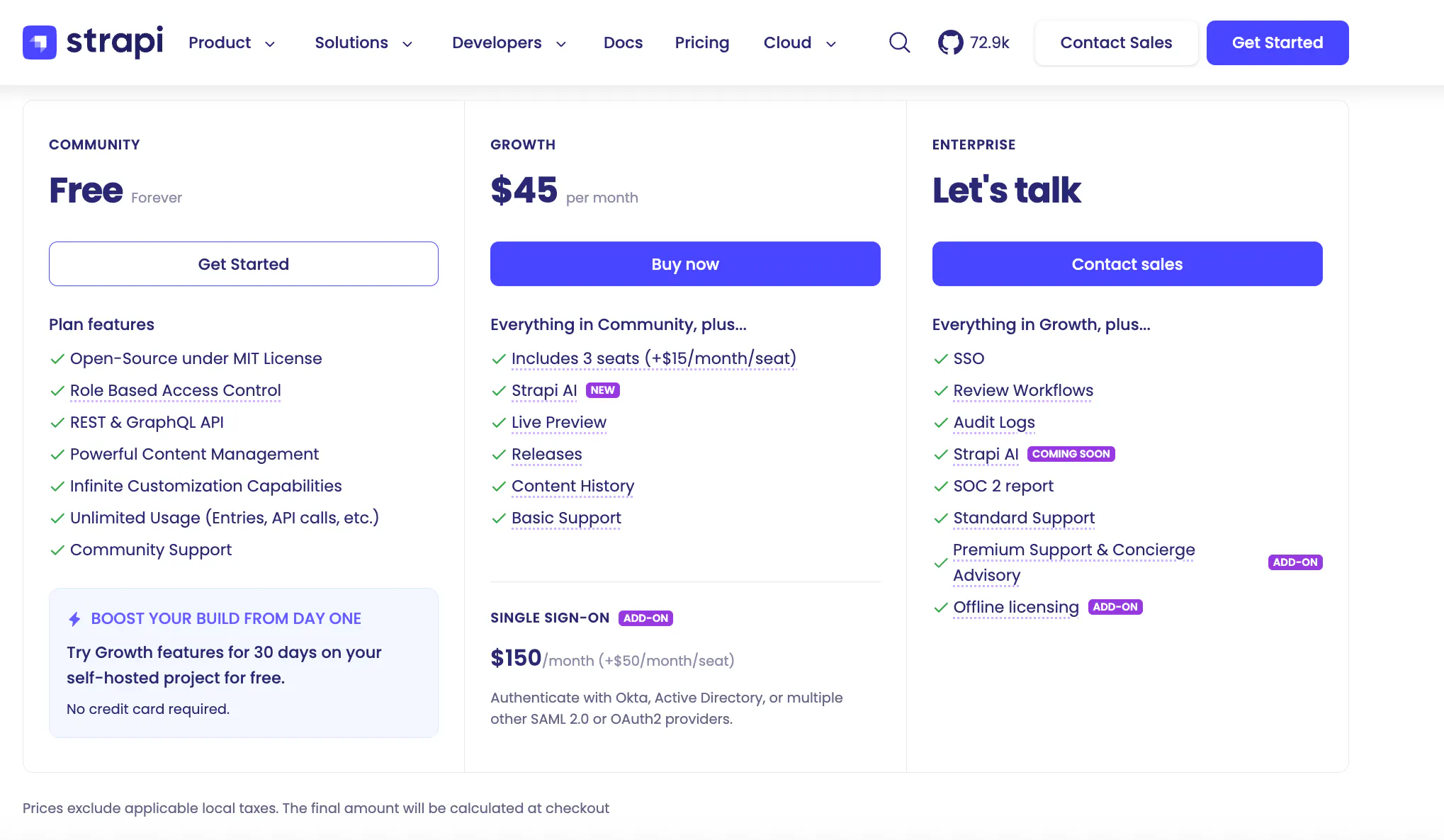
Strapi is among the oldest open-source headless CMS options in active development. A visual content type builder generates both the REST/GraphQL API and the editor admin panel. The plugin marketplace covers i18n, preview, SEO fields, and database adapters. Like Payload, the "free" tier means self-hosting on your own infrastructure.
Key features for free-tier projects
- Visual content type builder that generates API endpoints and admin UI automatically
- Role-based access control with customizable roles
- Both REST and GraphQL delivery APIs
- Plugin marketplace with 900+ community and official plugins for common requirements
Pros
The content type builder is accessible to developers who prefer a UI over schema-in-code. The plugin ecosystem reduces the need for custom code on common requirements like multi-language content, preview URLs, and sitemap generation. Strapi's maturity means a wide range of tutorials, integrations, and third-party support is available.
Cons
Self-hosting adds ongoing DevOps responsibility: database management, server configuration, and reverse proxy setup are your problem. Multiple G2 and Capterra reviews report that minor version upgrades introduce breaking changes requiring manual database migration scripts. (G2, 2025–2026; Capterra, 2025–2026)
The admin panel restarts fully on every content type save, which slows iterative schema development. Plugin compatibility with newer Strapi versions is inconsistent.
Pricing
MIT open source, self-host free. A small VPS suitable for development or low-traffic production runs $5–12/month. Strapi Cloud starts at $35/month (100K API requests, 50GB storage, managed deployment).
G2: 4.5/5 (205 reviews)
6. Directus
Best for: Teams with an existing SQL database who want to add a CMS layer and REST/GraphQL API without migrating data or altering the schema.
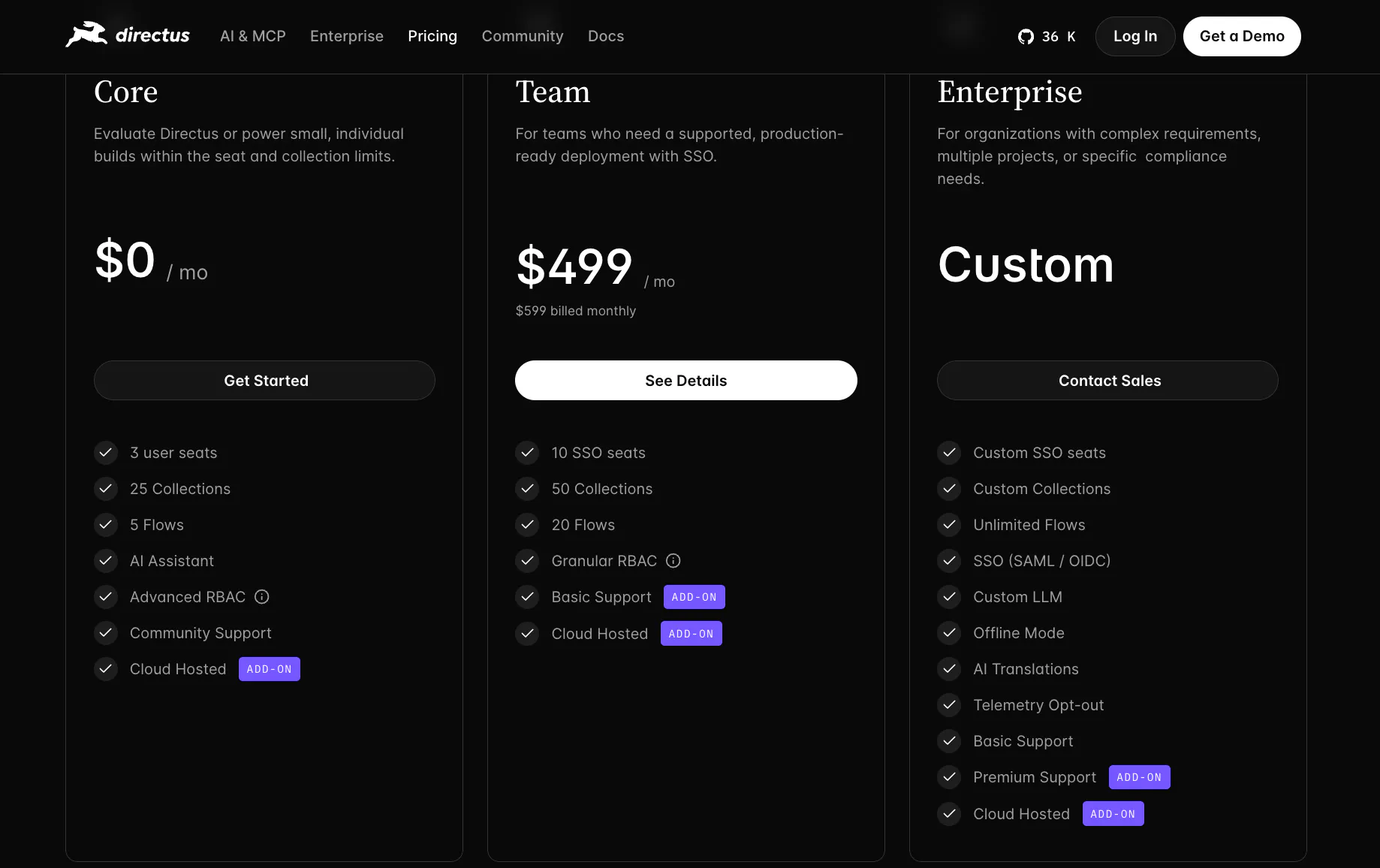
Directus connects to any SQL database (Postgres, MySQL, SQLite, MariaDB, MS SQL) and generates a REST and GraphQL API from the existing table structure without modifying it. Directus metadata is stored separately. The self-hosted Core tier is free forever and includes a full admin UI called Data Studio.
Key features for free-tier projects
- Non-destructive: your database schema stays intact; Directus stores its config in a parallel metadata layer
- Auto-generated REST and GraphQL APIs from any SQL table structure
- Data Studio admin panel with roles, field configuration, and visual content editing
- 25 collections and 5 automation flows on the Core self-hosted tier
Pros
Adding Directus to a production database requires no data migration. Developers reviewing it frequently cite its predictability: the admin panel reflects the actual database, with no hidden abstraction layer to debug. For internal tools and data management dashboards, setup is faster than a dedicated BI tool.
Cons
Relational data queries produce long, nested filter strings that are error-prone to construct by hand. Frequent major-version updates introduce breaking changes for self-hosted users who do not pin versions carefully.
The admin UI slows noticeably at 500+ rows per page. Migrating schema changes between environments (development to staging to production) has no built-in tooling, which means manual scripts at every promotion step.
Pricing
Self-hosted Core is free forever. Infrastructure for a small self-hosted instance runs $12–25/month. Directus Cloud (managed) starts at $99/month.
G2: 4.9/5 (52 reviews)
7. Ghost
Best for: Independent publishers and newsletter operators who want publishing, memberships, and email delivery in one self-hosted platform.
Ghost is not a general-purpose headless CMS. It is a publishing-focused platform with first-class membership and newsletter features built in. The MIT-licensed software is self-hosted. It ships a REST Content API for headless delivery to a custom frontend, though most Ghost sites use the built-in Handlebars frontend.
Key features for free-tier projects
- Native membership system with free and paid tiers, no third-party integration required
- Newsletter delivery to subscribers (requires a connected email service provider)
- Content API for headless consumption by any frontend
- Clean, markdown-native editor that non-technical writers can use without guidance
Pros
For publisher-first use cases, Ghost eliminates the need to integrate a CMS, a membership tool, and an email provider separately. Admin UI is clean enough that editorial staff can operate it without a training session. Ghost sites are fast by design because the platform is built for content pages rather than complex application experiences. (Ghost user community, Ghost Pro accounts 2025–2026)
Cons
Ghost does not include SMTP delivery for newsletters. You must connect an external email provider; Mailgun is the recommended option, and after its December 2025 pricing update, sending 20,000 emails/month costs approximately $35/month.
Self-hosting requires a VPS with at least 1GB RAM and Linux server management knowledge. The stable 2GB option from providers like DigitalOcean or Hetzner runs about $12/month. For teams without DevOps experience, this is not a realistic free option. (Ghost documentation)
Pricing
Self-hosted software is free (MIT). A realistic self-hosted setup costs $15–17/month at hobby scale (VPS + email) and $48–50/month once newsletter volume reaches 20,000 sends. Ghost Pro managed hosting starts at $18/month (billed annually) for up to 1,000 subscribers with email included.
G2: No G2 profile in the headless CMS category.
8. Hygraph
Best for: Teams building GraphQL-native APIs that need to federate content from multiple external data sources into a single schema.
Hygraph is a hosted headless CMS built around GraphQL. Its Content Federation feature lets you extend the Hygraph schema with data from external REST or GraphQL APIs, querying Hygraph content alongside Shopify products or Salesforce records in a single request.
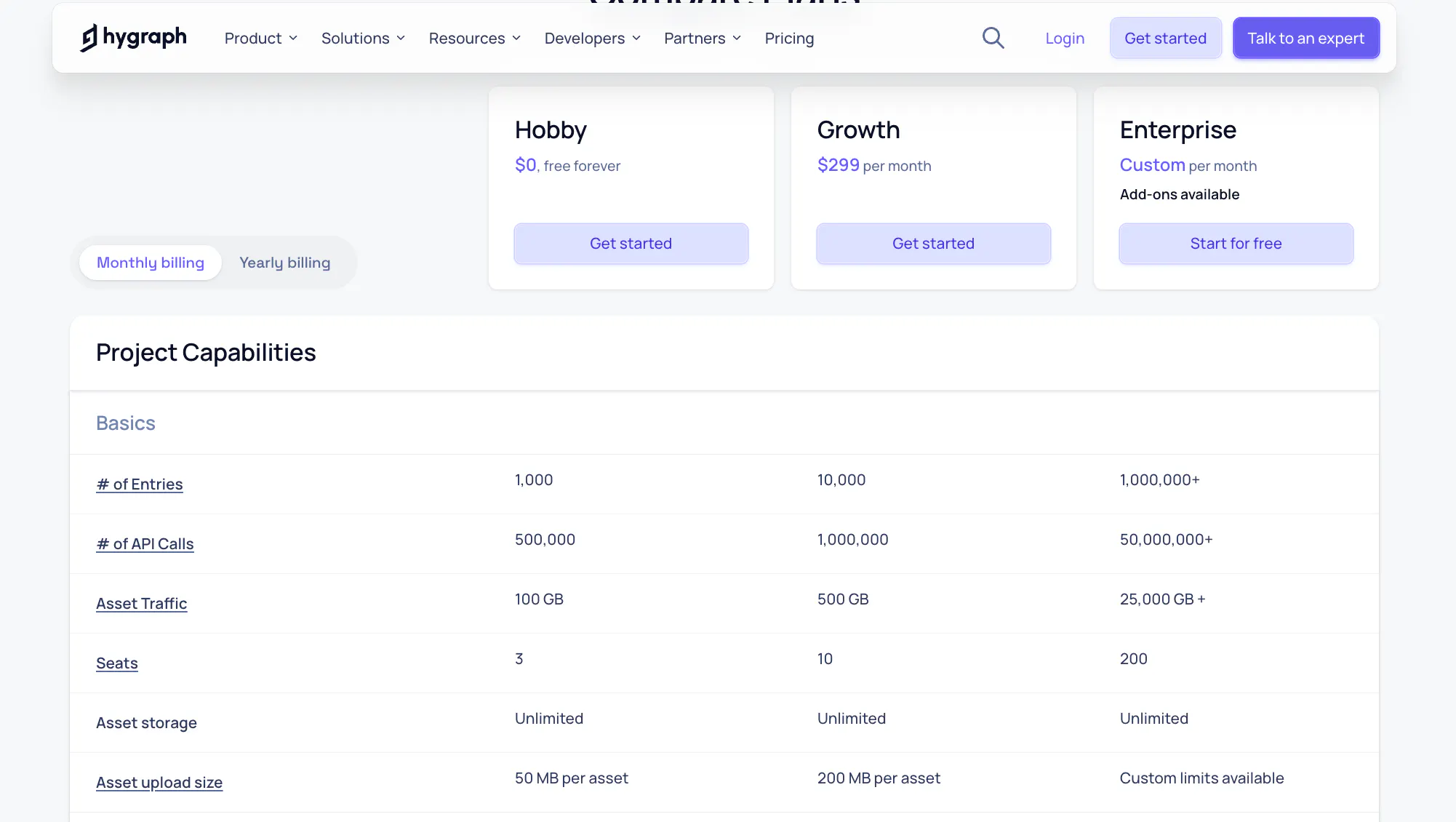
The free Community plan covers small projects, but the 1,000-record limit makes it the most restrictive cloud-hosted option among the free headless CMS platforms in this comparison.
Key features for free-tier projects
- GraphQL delivery API with real-time subscriptions on all plans including free
- Content federation: combine Hygraph content with external API data in a single unified schema
- Webhooks for content lifecycle events (publish, update, delete)
- 3 editor seats and 2 locales on the free plan
Pros
For teams working in GraphQL stacks, Hygraph's schema-first approach integrates naturally with existing query infrastructure. Federation lets you reduce client-side API calls when content spans multiple services. API response times are fast compared to REST-based platforms.
Cons
1,000 records is the lowest free tier limit in this comparison. Any content-heavy project hits it quickly. The jump to paid is $199/month with no option in between; several G2 reviews describe this as "restrictive for smaller teams" and "makes it hard to grow without a significant budget commitment."
Using Hygraph effectively requires GraphQL knowledge, which raises the bar for non-developer contributors. The editor lacks autosave, so unsaved content changes are lost on an accidental page close.
Pricing
Free Community plan: 1,000 records, 500K API operations, 100GB asset traffic, 3 seats, 2 locales, 1 environment. Scale plan: $199/month. There is no tier between these two.
G2: 4.4/5 (730 reviews)
9. Cosmic JS
Best for: Solo developers or small teams building micro-projects who want a hosted CMS with zero infrastructure to manage.
Cosmic JS is a hosted headless CMS with a simple REST API and a clean object-based content model. Free plan setup takes minutes, there is nothing to host or configure, and the API design is simple enough to understand in an afternoon. The trade-off is a low non-cached API request limit.
Key features for free-tier projects
- REST API with 10K non-cached and 100K CDN-cached API calls per month
- Media library with 1GB storage and CDN image transformation
- Object types with custom metafields for flexible content structures
- 2 team member seats on the free plan
Pros
For brochure sites, landing pages, or small blogs, the free tier is sufficient indefinitely if content is served from CDN cache. The API design is simple enough for developers without CMS experience to consume immediately. The hosted setup eliminates all infrastructure decisions. (G2 reviews, though sample is small)
Cons
10K non-cached API requests per month is hit quickly on any project that fetches content on each server-side render rather than using static generation or CDN caching. The G2 review base is very thin (6 reviews), which makes the rating less reliable than the other platforms here. Platform development activity has been slower than competing options in recent years.
Pricing
Free forever: 1,000 objects, 10K non-cached API requests/month, 100K CDN-cached requests, 1GB bandwidth, 1GB media storage, 2 team members. Paid plans start at $49/month.
G2: 4.3/5 (6 reviews)
The actual cost of “free” self-hosted vs cloud-hosted
Strapi, Directus, Payload CMS, and Ghost are free as software. The running cost comes from what you deploy them on.
A stable 2GB VPS (the minimum for any of these in production) costs $12–25/month across DigitalOcean, Hetzner, or Railway. Add a managed Postgres database ($5–15/month on Supabase or Neon's paid tier) and Ghost needs an email service on top of that. The all-in cost for a self-hosted CMS running in production is typically $20–50/month before any traffic growth.
Payload CMS is the exception: the official Vercel + Neon Postgres template fits within Vercel's hobby tier for low-traffic projects, keeping infrastructure cost near zero. Neon's free tier caps at 0.5GB storage and 100 CU-hours per month, which covers small projects.
The harder cost is maintenance time. Breaking changes on upgrades are a documented recurring issue for both Strapi and Directus on G2. Database migrations, security patches, and version pinning are ongoing developer responsibilities. Teams without someone who can commit to that maintenance should weigh hosted options more carefully than the monthly cost comparison suggests.
Cloud-hosted options tell a different story over the same 12-month window. Prismic, Sanity, Contentful, Hygraph, and Cosmic JS charge nothing for infrastructure because they handle it.
A team running Prismic or Sanity on the free tier spends $0 on servers, $0 on database management, and zero hours on version upgrades. If that team's developer time is worth $50–100/hour, even two hours per month of self-hosted maintenance erases the infrastructure savings of self-hosting entirely.
The break-even calculation favors cloud-hosted for any team that bills time, has a small DevOps headcount, or is building something where reliability matters more than software ownership. Self-hosted wins on control, on data residency requirements, and on projects where the infrastructure is already paid for.
What the free tier limits actually mean for your project
Marketing site or blog under 10,000 pages, single editor: Prismic, Sanity, and Contentful all work without paying. Prismic gives unlimited documents and the highest API call allowance; Sanity gives the most multi-seat headroom; Contentful gives the most documented framework integration path.
Existing database that needs a CMS layer: Directus self-hosted is the only option here that adds a CMS and API to your existing schema without data migration.
Newsletter or publication with membership features: Ghost is in a category by itself. No other platform in this comparison ships membership and email delivery as first-class features without third-party integrations.
TypeScript Next.js app where the developer is also the editor: Payload CMS's co-location approach and Local API eliminate the network call layer entirely, making it the fastest option architecturally for server-heavy Next.js projects.
Any project that will eventually need more than one editor: Sanity's 20-seat free plan is the only hosted option that scales to a real team without paying first. Prismic upgrades to 3 users for $10/month if team size is the only constraint.
See what unlimited content looks like with a visual builder
You have seen how Prismic compares on free tier limits. The demo shows you the page builder and Type Builder in action - how developers define the sections and editors assemble pages without a handoff.
FAQ
Prismic publishes this article. Prismic is one of the headless CMS platforms reviewed above. Free tier limits and pricing were verified against each vendor's pricing page. G2 ratings reflect August 2026 data.
Related posts