Take Control of Your Prismic Billing With Spend Manager
A new setting to manage how your plan handles usage limits
Hi everyone,
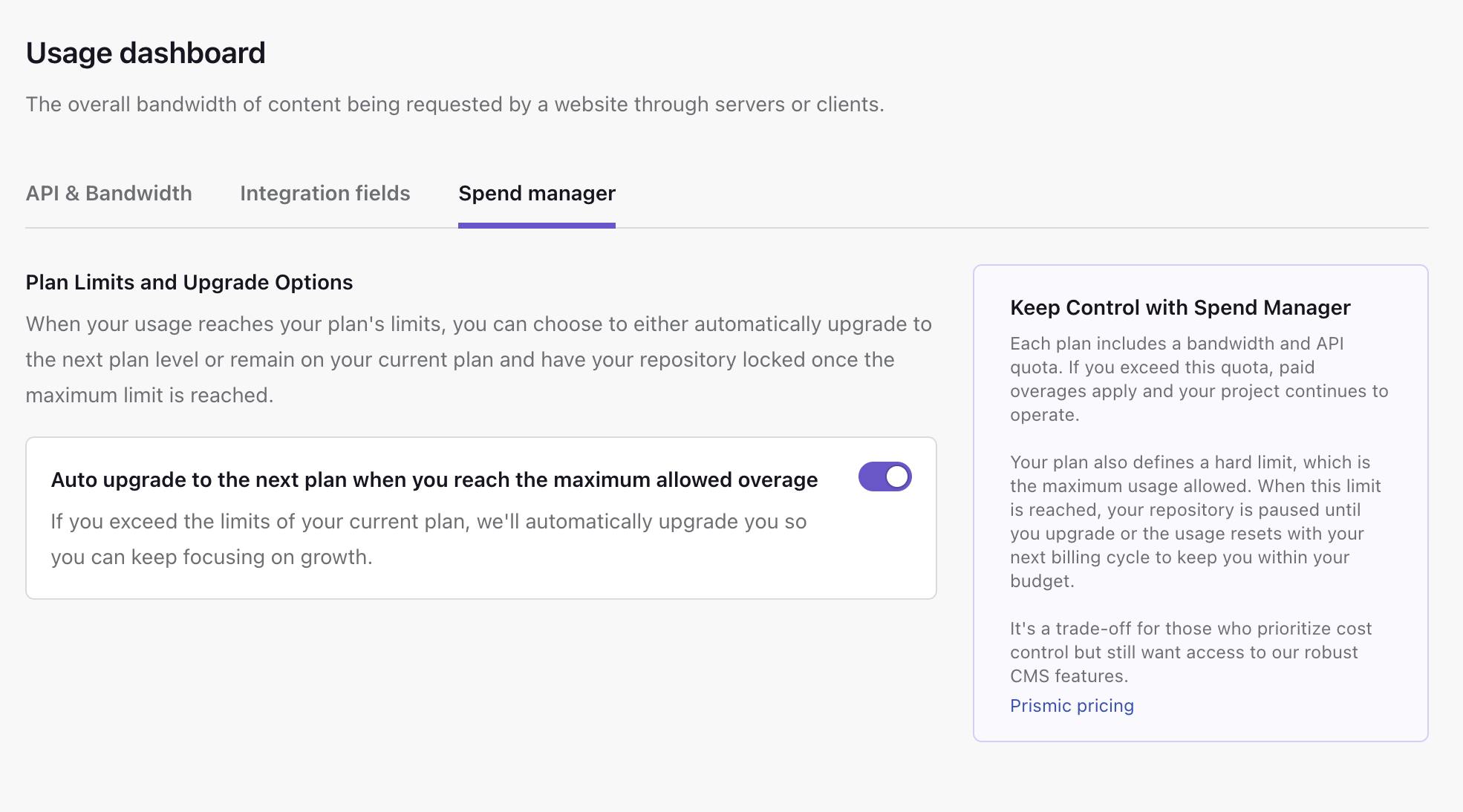
Your website traffic can be unpredictable. A blog post goes viral, a product launch exceeds expectations, and suddenly you're approaching your plan limits. We've heard your feedback: you want more control over what happens next.
Today, we're introducing Spend Manager, a new setting in your Usage Dashboard that lets you choose how Prismic handles upgrades when your repository reaches its CDN bandwidth or API call limits.
Head to Settings → Usage Dashboard to configure your preferences.

François Rivière
January 20, 2026Auto-Upgrade with Spend manager
When your repository approaches its plan limits, Spend Manager gives you two paths forward.
Auto-upgrade enabled keeps your site running without interruption. When you exceed your CDN bandwidth or API call limits, Prismic automatically moves you to the next plan tier. This is the default setting and ensures your visitors never experience downtime.
Auto-upgrade disabled gives you strict budget control. Your repository will pause at the hard limit until you manually upgrade or your next billing cycle begins. Content delivery stops, but you're never charged more than you've agreed to.
Choose the option that fits your team's needs in Settings → Usage Dashboard.
Fresh out of the oven
What else is cooking?
There's more to explore
Discover the latest features and get a sneak peek at what's coming next.
